
Download and install Mixxx, the most advanced free Streaming software, to try our free ICEcast Demo please follow the instructions in this article.
For Windows and MAC users.
Auto-Switch from AutoDJ to Live Broadcast and vise versa, no need to disable-enable or stop-start your AutoDJ.
Download Mixxx, the most advanced free DJ software:
Mixxx 2.0.0 For Windows 64-bit
Mixxx 2.0.0 For Windows 32-bit
Mixxx 2.0.0 For Mac Intel 10.5+
Extract ZIP or 7z File and follow instructions included at ZIP or 7z File to install the software.
Or download latest version of MIXXX from mixxx.org
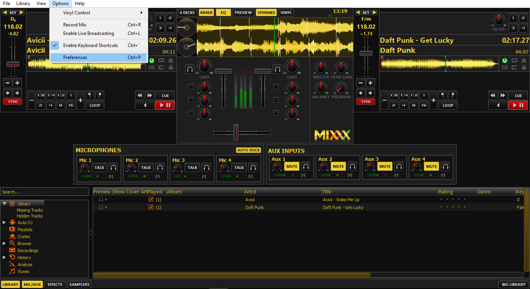
1. Run Mixxx and choose "Options" > "Preferences":
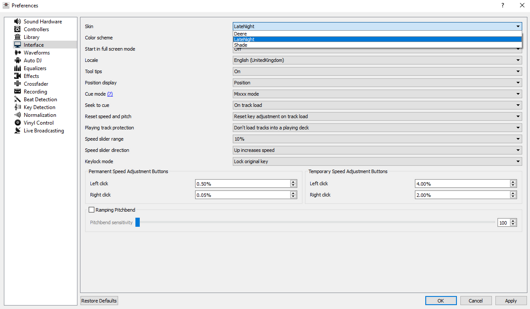
2. At "Mixxx Preferences" window choose "Interface" > "Skin LateNight" to use this nice skin and press "OK" to save:
3. At "Mixxx Preferences" window choose "Live Broadcasting" and use the settings of the following image:
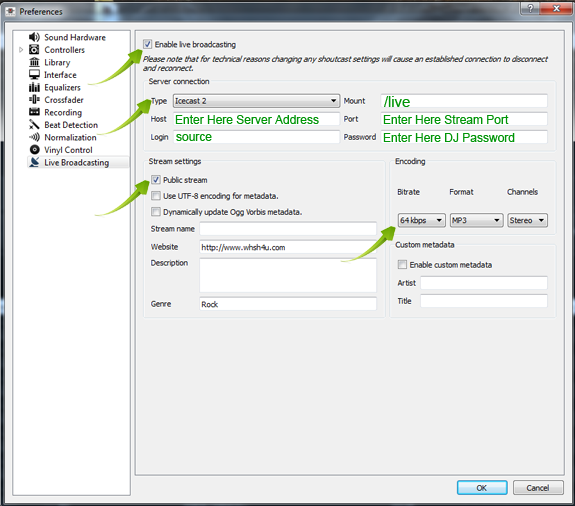
Click "OK" at "Mixxx Preferences" window.
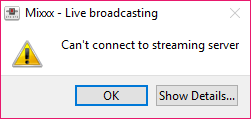
If your settings are not correct, Mixxx will inform you,
(In this case, check again your settings at "Mixxx Preferences" window):
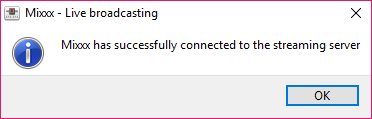
If everything is OK, Mixxx will inform you:
4. Load your mp3s at Decks of Mixxx and click "play" button.
For ICEcast FREE Demo use:
Host: demos.whsh4u.com
Port: 9006
Password: hsuseradio
CLICK HERE for ICEcast Admin Page
For Centova Cast SHOUTcast Streaming Instructions Click Here.